Introduction
E-commerce has changed the way businesses sell products. Customers can now discover products, compare prices, place orders, and make payments through online stores without visiting a physical shop.
Shopify is one of the platforms that helps businesses establish and manage these online stores. It provides tools for creating a website, adding products, managing orders, connecting payment methods, and supporting marketing activities.
Whether you want to launch a small niche store, build a branded business, sell digital products, or manage a larger e-commerce operation, Shopify offers a structured way to manage many essential parts of online selling.
However, launching a successful Shopify store involves more than choosing a theme and uploading products. You also need to understand your customers, select suitable products, build trust, manage payments, and attract qualified traffic.
What Is Shopify?
Shopify is an e-commerce platform that allows businesses to create and operate online stores.
You can use it to build a branded website, organize product collections, manage inventory, process orders through supported payment providers, and connect third-party applications.
Shopify also supports eligible selling channels and integrations that help businesses manage different parts of their operations.
Official website: https://www.shopify.com
Shopify is a hosted platform, meaning the core store infrastructure is managed for you. This reduces the need to configure your own web server, although you still need to manage your store settings, content, apps, security practices, and business operations.
How Does Shopify Work?
The basic process is straightforward:
- Create a Shopify account.
- Select a suitable store name and domain.
- Choose and customize a theme.
- Add products and collections.
- Configure shipping, taxes, and payment settings.
- Create essential store policies.
- Test the shopping and checkout experience.
- Launch your store.
- Promote your products and monitor performance.
The exact setup depends on the country you operate from, the products you sell, your payment providers, and your delivery model.
Types of Businesses You Can Build with Shopify
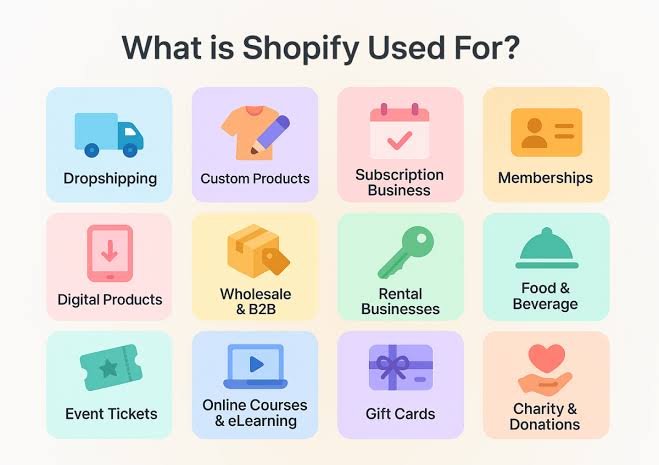
1. Dropshipping Store
Dropshipping allows a store owner to sell products without holding the stock personally. When a customer places an order, a supplier or fulfilment partner prepares and ships the product.
The store owner remains responsible for the customer experience, marketing, accurate product information, and handling customer complaints.
Useful tools:
- DSers: https://www.dsers.com
- AutoDS: https://www.autods.com
- Zendrop: https://www.zendrop.com
Before choosing a supplier, investigate shipping times, product quality, inventory reliability, return procedures, and the total cost of fulfilment.
2. Branded E-commerce Store
A branded store focuses on a particular identity, audience, or product category.
For example, a business could specialize in skincare, home accessories, fitness products, or everyday household essentials.
A strong brand should have a clear purpose, consistent visual design, trustworthy product information, and reliable customer service.
Useful tools:
- Canva: https://www.canva.com
- Adobe Express: https://www.adobe.com/express
- Shopify Themes: https://themes.shopify.com
3. Digital Product Store
Shopify can also sell eligible digital products such as ebooks, downloadable templates, educational resources, and other files.
You can create product listings and use a digital delivery application to provide purchased files electronically.
Official guide: https://help.shopify.com/en/manual/products/digital-service-product
This model eliminates physical shipping, although you still need to consider payment processing, digital file security, customer support, and applicable taxes.
4. Print-on-Demand Store
Print-on-demand businesses sell products such as T-shirts, posters, mugs, and other printed items. A fulfilment partner produces the item after a customer orders it.
This model can reduce the need to purchase inventory upfront, although production, shipping, and product costs affect profitability.
Useful tools:
- Printful: https://www.printful.com
- Printify: https://printify.com
Check the provider’s fulfilment locations, delivery estimates, product quality, and return policies before launching.
How to Create a Shopify Store Step by Step
Step 1: Create Your Account
Visit https://www.shopify.com and follow the account creation process.
Choose your store name and business details carefully. Your store name should be memorable, relevant to your business, and suitable for future growth.
Before investing in a brand, check domain availability and potential trademark conflicts.
Step 2: Choose a Domain Name
A domain is the website address customers use to visit your store.
For example, a business might use yourbrand.com rather than a long or complicated web address.
You can purchase or connect a domain through Shopify or an external domain registrar.
Official guide: https://help.shopify.com/en/manual/domains
A professional domain can improve brand recognition, but it does not automatically make a store trustworthy. The website’s design, policies, products, and customer service also matter.
Step 3: Choose a Theme
A Shopify theme controls much of your store’s visual layout, including the homepage, product pages, collection pages, and navigation.
Browse available themes here:
When choosing a theme, consider:
- Mobile responsiveness.
- Page loading performance.
- Product image presentation.
- Navigation and search.
- Readability and contrast.
- Customization options.
- Compatibility with your intended features.
A clean, easy-to-use theme is usually a better starting point than a visually complicated design that makes products difficult to understand.
Step 4: Design Your Homepage
Your homepage should quickly explain what your business sells and help customers find relevant products.
A useful structure includes:
- A clear announcement or value proposition.
- A professional header and navigation menu.
- A hero section with a relevant image and call to action.
- Featured product categories.
- Popular products or collections.
- Genuine customer reviews, where available.
- Shipping, support, or return information.
- A footer with contact details and policies.
Avoid overcrowding the page with pop-ups, excessive animations, and repeated promotional messages.
Step 5: Add Products
Each product listing should provide accurate and useful information.
Include a descriptive title, clear images, price, available options, important specifications, and a concise explanation of the product’s benefits.
For physical products, provide accurate information about materials, dimensions, compatibility, and care requirements where relevant.
For digital products, explain the file format, contents, access method, and any software requirements.
Do not copy another seller’s copyrighted photographs or descriptions without permission.
Step 6: Organize Collections
Collections group related products together so customers can browse your store more easily.
For example, a home store might create collections for kitchen accessories, lighting, cleaning tools, and storage products.
Use collection names that customers can understand immediately. A simple structure helps users find products without navigating unnecessary menus.
Step 7: Configure Payments
Customers need a reliable way to pay for their orders.
Shopify supports different payment methods depending on your country, business eligibility, and chosen provider.
Official payment information: https://help.shopify.com/en/manual/payments
Important for businesses operating from Pakistan: Do not assume Shopify Payments is available to your business simply because Shopify supports it in other countries. Review the current list of supported countries and the requirements for each payment provider.
You may need an eligible third-party payment gateway that accepts your business type and supports payouts to your actual bank account. Confirm fees, settlement times, verification requirements, refunds, and chargeback procedures before launching.
Step 8: Configure Shipping and Delivery
For physical products, create shipping rates and delivery settings that match your fulfilment model.
You should consider:
- Delivery destinations.
- Shipping fees.
- Estimated delivery times.
- Order tracking.
- Failed deliveries.
- Returns and exchanges.
- Supplier processing times.
For dropshipping, do not advertise delivery times that your supplier cannot consistently meet.
For digital products, configure the appropriate file delivery method instead of physical shipping.
Step 9: Create Essential Policies
A professional store should clearly explain how it handles customer information, orders, returns, refunds, delivery, and customer complaints.
Useful pages include:
- Privacy policy.
- Terms of service.
- Refund and return policy.
- Shipping policy, if applicable.
- Contact page.
- Frequently asked questions.
Shopify policy resources: https://help.shopify.com/en/manual/your-account/policies
Adapt your policies to your actual business practices and the laws that apply to your customers. Do not publish promises that your business cannot honour.
Step 10: Test Your Store Before Launch
Before promoting your website, review the entire customer journey.
Check that product pages work, images load correctly, navigation is understandable, forms function, and checkout settings are configured.
Test the store using Shopify’s supported test-payment options where available. Confirm that order notifications and digital delivery workflows work as expected.
Essential Shopify Tools and Apps
Shopify’s app ecosystem allows store owners to add features for marketing, analytics, product delivery, customer service, and fulfilment.
1. Shopify App Store
Link: https://apps.shopify.com
The official app marketplace offers integrations for different business requirements.
Before installing an app, review its pricing, permissions, reviews, support, and compatibility with your theme and other apps.
2. Google Analytics
Link: https://analytics.google.com
Google Analytics helps you understand how people interact with your website.
It can help you examine traffic sources, user behaviour, landing pages, and important conversion events when correctly configured.
3. Google Search Console
Link: https://search.google.com/search-console/about
Google Search Console helps website owners monitor how their pages appear in Google Search.
It provides information about search performance, indexing, and certain technical issues.
4. Klaviyo
Link: https://www.klaviyo.com
Klaviyo offers email and SMS marketing tools for eligible businesses.
Store owners can use these tools for customer newsletters, product announcements, and automated messages such as abandoned-cart reminders, subject to applicable consent and messaging requirements.
5. Judge.me
Link: https://judge.me
Judge.me provides product review tools for online stores.
Genuine reviews can help customers understand product quality and buying experiences. Reviews should be collected and displayed in accordance with applicable laws and platform rules.
6. Shopify Search & Discovery
Link: https://apps.shopify.com/search-and-discovery
This Shopify app helps merchants customize product discovery through search, filters, recommendations, and related features supported by the app.
It can be especially useful for stores with many products or collections.
7. Digital Downloads
Link: https://apps.shopify.com/digital-downloads
Shopify’s Digital Downloads app can help merchants deliver eligible digital files to customers.
Review the current app documentation to understand its file limits, delivery options, and compatibility with your products.
Shopify SEO: How to Help Customers Find Your Store
Search engine optimization helps search engines understand your store and can bring relevant visitors to your product pages.
Research Relevant Keywords
Identify the phrases customers use when searching for your products.
Useful tools include:
- Google Trends: https://trends.google.com
- Google Keyword Planner: https://ads.google.com/home/tools/keyword-planner/
- Google Search Console: https://search.google.com/search-console/about
Use keywords naturally in product titles, descriptions, page headings, and relevant image alt text.
Write Useful Product Descriptions
A good product description explains what the product does, who it is for, its important features, and the problem it helps solve.
Avoid repeating the same keyword excessively or making unsupported claims.
Optimize Images
Use clear product images and appropriate file sizes. Add descriptive alternative text where useful so that people using assistive technologies can understand the image’s purpose.
Publish Helpful Content
A blog can answer customer questions and provide information related to your products.
For example, a home-accessories store could publish articles about organizing small spaces, choosing storage solutions, or maintaining household items.
Improve Mobile Usability
Many customers browse stores on smartphones. Make sure text is readable, buttons are easy to tap, product images display correctly, and checkout is straightforward.
SEO takes time and does not guarantee rankings. Review performance regularly and improve pages based on customer needs and available data.
How to Market a Shopify Store
Building the store is only one part of the business. Customers must also discover your products.
1. Facebook and Instagram Advertising
Meta advertising can help businesses reach audiences based on available targeting and optimization options.
Official platform: https://www.facebook.com/adsmanager
Before launching campaigns, install and test the appropriate Meta Pixel and, where applicable, Conversions API integrations.
Start with a clear objective, a controlled budget, relevant creatives, and accurate product pages. Track purchases and the actual cost of acquiring customers.
Do not judge advertising performance by clicks alone.
2. Organic Social Media Content
Publish useful videos, demonstrations, product comparisons, tutorials, and answers to common customer questions.
For example, a kitchen-products store could demonstrate how a product works, explain its dimensions, or compare different uses.
Content should accurately represent the product and avoid misleading edits.
3. Email Marketing
Email marketing can help you communicate with customers who have consented to receive messages.
You can use it for product announcements, educational content, order-related communications, and eligible promotional campaigns.
4. Influencer Partnerships
Working with relevant creators may help you introduce products to an interested audience.
Evaluate the creator’s audience relevance, engagement quality, content style, and commercial terms. Clearly disclose paid partnerships where required.
5. Conversion Rate Optimization
Conversion rate optimization involves improving the percentage of visitors who complete a desired action, such as making a purchase.
Review product-page clarity, shipping information, checkout friction, mobile usability, and the quality of your product images.
Test changes systematically rather than assuming that every design change will improve sales.
Important Shopify Metrics to Track
Monitor the following indicators to understand your store’s performance:
Sessions: The number of visits or browsing sessions your store receives.
Conversion rate: The proportion of visitors or sessions that result in a purchase, depending on the reporting method.
Average order value: The average revenue generated per order.
Customer acquisition cost: The marketing cost required to acquire a customer, calculated using a clearly defined method.
Gross profit: Revenue remaining after the cost of goods sold, before other operating expenses.
Refund and return rate: The proportion of orders or sales that are refunded or returned, using a consistent definition.
Contribution profit: Revenue remaining after relevant variable costs, such as product cost, fulfilment, payment fees, and advertising.
These metrics should be interpreted together. A store can generate sales while losing money if advertising, product costs, refunds, and fulfilment expenses are too high.
Common Shopify Mistakes to Avoid
Choosing Products Without Research
A product that looks attractive is not necessarily profitable. Research customer demand, competitors, fulfilment costs, and the amount customers are willing to pay.
Installing Too Many Apps
Every additional app introduces costs and may affect performance, compatibility, or maintenance. Install only tools that solve a clear business problem.
Using Poor Product Images
Blurry images, inconsistent backgrounds, and inaccurate product representations can reduce customer confidence.
Ignoring Customer Service
Customers need clear communication about delivery, returns, refunds, and product questions. Poor support can damage trust and increase disputes.
Scaling Ads Too Quickly
Increasing advertising spend without reliable conversion data can lead to unnecessary losses. Confirm that tracking works and that orders are profitable before scaling.
Neglecting Legal and Payment Requirements
Check payment eligibility, privacy requirements, consumer protection obligations, advertising rules, and tax responsibilities relevant to your business and customer locations.
Conclusion
Shopify provides a flexible platform for building an online store, managing products, processing orders through supported providers, and connecting marketing tools.
It can support dropshipping, branded e-commerce, digital downloads, print-on-demand, and many other business models.
The strongest starting point is a clear business idea, a reliable fulfilment or delivery system, accurate product information, a simple customer experience, and a realistic marketing plan.
Shopify does not guarantee sales or profit. Long-term success depends on understanding customers, controlling costs, providing reliable service, and continuously improving your store using real performance data.